
CalmPhone
A minimalist Android launcher that filters notifications by meaning, sorts your apps into categories, and limits how long you spend in each one — all on the phone itself.
Android 8.0+arm64 & x86_64no Google Play
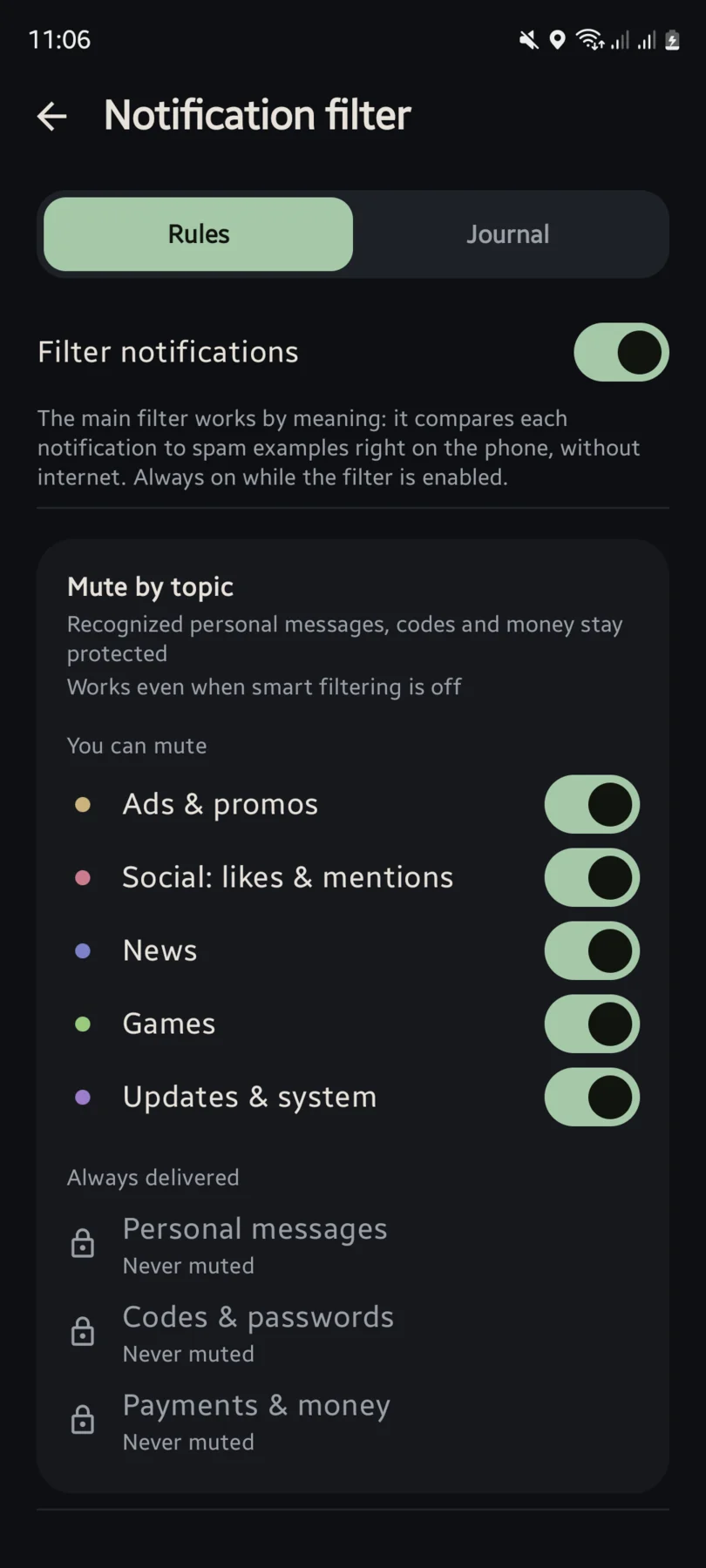
Notification filter
Every notification is judged on the phone: fast rules first, then a small language model that recognises mass promo by meaning, in Russian and English alike. Personal messages, calls, one-time codes and payment alerts are let through before any text is analysed. Everything hidden goes into a local journal you can read and correct.
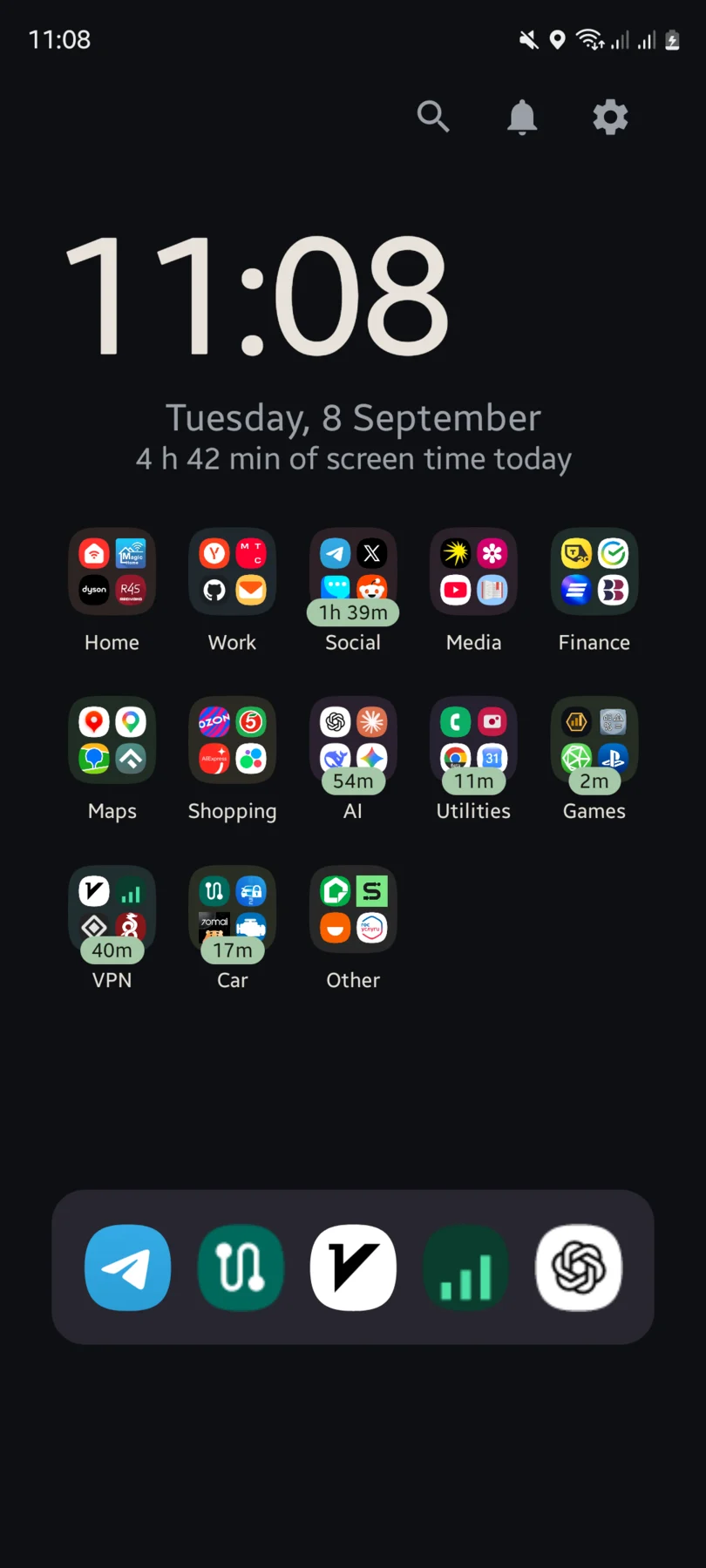
Automatic categorisation
Apps sort themselves into category folders, so the home screen stays a short list instead of a wall of icons. You can still pin any app to a category by hand.
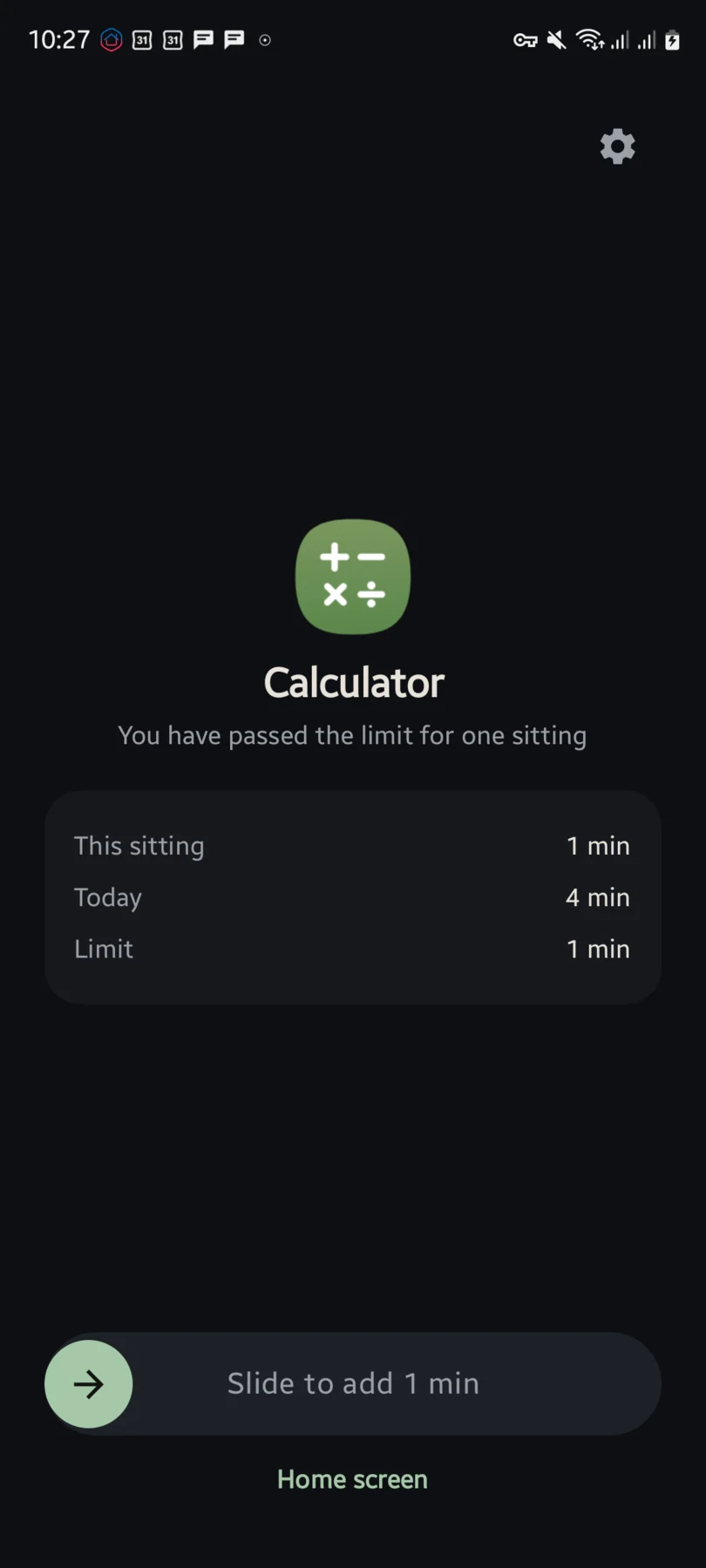
App timer
Two independent limits — one sitting and per day — each with an Off position, so you can keep only one of them; both are off on a fresh install. Past the limit, the app you're using is covered by a reminder showing this sitting, today and the limit, and you add the same amount again by sliding, not tapping, so the decision is deliberate. Apps can be excepted one by one or by whole category.
Privacy
CalmPhone has no way to send anything off the phone, and no code in it tries to.
- No
INTERNETpermission at all — Android would refuse the network call before it left the phone. - No account, no cloud.
- No analytics or crash reporting.
- The notification journal never leaves the phone.
- No VPN.
- No root.
Permissions declared: seven
QUERY_ALL_PACKAGES— a launcher has to see every installed app.PACKAGE_USAGE_STATS— powers screen time and the app timer; a special access you grant by hand.REQUEST_DELETE_PACKAGES— lets "Uninstall" open Android's own dialog.FOREGROUND_SERVICE— lets the timer's service keep checking the foreground app once a second while the screen is on.FOREGROUND_SERVICE_SPECIAL_USE— declares what kind of foreground service that is, as Android now requires; it runs only while at least one limit is on.SYSTEM_ALERT_WINDOW— "display over other apps", to draw the timer's reminder over what you're using; optional, granted by hand.POST_NOTIFICATIONS— Android 13+, for that service's own permanent notification.
Download
Direct APK download, about 130 MB. The multilingual model that recognises promotional notifications ships inside the app instead of being fetched later, so filtering works offline from the first launch.
Android will warn that this app is not from the Play Store — that's expected for a direct download. If you want to double-check the file, compare the SHA-256 above with the checksum of the downloaded file.
Download the APK
Tap the button above; the file downloads through your browser like any other file.
Allow installs from this app
Android will ask whether to allow installs from the app you downloaded it with. Turn it on for that one app, or later in Settings → Apps → Special access → Install unknown apps.
Install it
Open the downloaded file again and tap Install. The system still shows its own confirmation dialog.
Set it as your home screen
Open Access inside the app and tap "Grant" on "Default launcher", or go to Settings → Apps → Default apps → Home app and pick CalmPhone.
To switch back later, open the same screen and choose your old launcher. Nothing about your apps or data changes either way.
Questions people actually ask
How do I install an APK that isn't from Google Play?
Download the APK, open it, and Android will ask whether to allow installs from the app you downloaded it with. On Android 8 and later that permission is granted per app in Settings → Apps → Special access → Install unknown apps. Turn it on for that one app, tap the file again, and install. You can turn the permission back off afterwards.
Which permissions does it ask for, and why?
Seven are declared in the manifest, listed one by one in the Privacy section above. Beyond that, everything is opt-in: notification access powers the filter, usage access powers the timer, and an optional accessibility service adds exactly one gesture — swipe down for the system notification shade. Swipe up for the app list and swipe left for the journal need no special access at all.
Does it send anything anywhere?
No. The app does not have the INTERNET permission, so Android would block a network request even if the code tried to make one — and it does not: there is no HTTP client, no socket, no WebView, and no analytics, telemetry or crash-reporting SDK. There is no account and no sync. The only files you can export — a settings backup and an anonymised filter-feedback file — are saved by you, by hand, through the system file picker.
How do I make it my launcher — and how do I switch back?
Open Access inside the app and tap "Grant" on "Default launcher", or go to Settings → Apps → Default apps → Home app and pick CalmPhone. Switching back is the same screen: choose your old launcher. Nothing about your apps, data or home screen elsewhere is modified.